How to Clean Up Claude Code Copy-Paste (and Get the Markdown Back)
July 23, 2026
I needed to get Claude's answer into a doc…
I was recently deep in a debugging session with Claude Code, and it produced a genuinely good root-cause writeup — the kind of thing you want in the ticket so the next person doesn't have to re-derive it. So I selected it in the terminal, copied, pasted, and got this:
⏺ Root Cause

  The proxy timeout is shorter than the upstream timeout, so every slow
  request gets cut off before the server can respond.

  ⎿  Read 42 lines (ctrl+o to expand)

✻ Cogitating… (esc to interrupt · 3.2k tokens)
Every line prefixed with ⏺ or ⎿. Paragraphs chopped at my terminal's width with stray indentation. Spinner glyphs and (ctrl+o to expand) hints riding along. And the headings, lists, and code blocks Claude actually wrote? Flattened into plain text.
As you probably know, terminals don't exactly make this easy. After hand-cleaning one paste too many, I did what I usually do: figured out exactly why it happens, then built a free tool to do it in one paste — the Claude Code Paste Cleaner.
Let's look at why the mess happens, and the two ways to deal with it.
Why your Claude Code pastes look broken
Claude Code renders responses for a terminal, not for your clipboard. When you copy, you're copying the rendering — and three things come along for the ride:
- The UI draws itself into your selection. Every assistant message gets a
⏺bullet, every tool result gets a⎿marker, and spinner frames (· ✢ ✳ ✶ ✻ ✽), box borders, and hint text are all just characters on screen, so they all get copied. - The terminal hard-wraps text. Long lines break at your window width, and copying captures those visual breaks as real newlines — usually with leading spaces from the hanging indent. That's why pasted paragraphs break mid-sentence every 80-odd characters.
- Markdown gets flattened, not styled. This is the one most people miss. The renderer replaces markdown with terminal styling:
## Headingbecomes bold text (the boldness is an ANSI code your clipboard drops), inline code loses its backticks, blockquotes become a▎bar, and nested lists cycle their markers by depth —1.→a.→i.. By the time it's on your screen, the markdown syntax is simply gone.
Method 1: Quick and Dirty — Clean It by Hand
If you only do this once in a while, you can fix a paste manually. If you're up for it, here's the drill:
- Delete the
⏺and⎿prefixes and any spinner/hint lines. - Re-join the wrapped lines into paragraphs (find-and-replace helps, but lists and code will fight you).
- Re-add the
#s, backticks, and>s from memory.
It works. It's also tedious enough that you'll stop sharing Claude's writeups, which is the real cost. There are a couple of general-purpose terminal cleaners out there that handle step 1, but they only delete — nothing brings the formatting back.
Method 2: Quick and Clean — The Claude Code Paste Cleaner
To make things easier, I built the Claude Code Paste Cleaner. Paste in the mess, and it gets the job done in seconds — no submit button, it cleans as you paste.
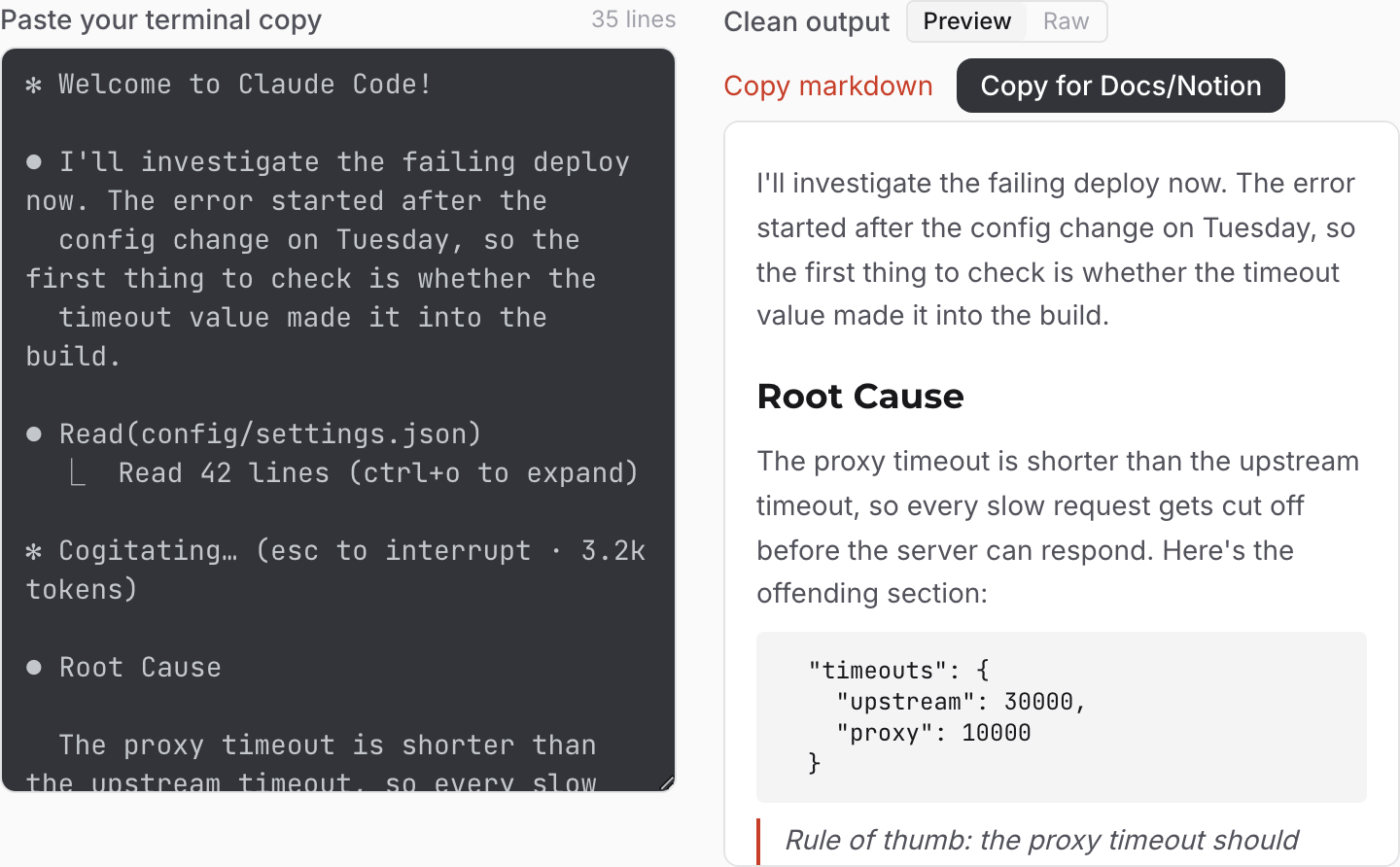
It has two modes:
- Plain text strips everything — prefixes, glyphs, borders, chrome lines, escape codes — and re-joins the wrapped lines. Flat clean text for tickets, commit messages, and Slack.
- Markdown does the same cleanup, then rebuilds the structure: blockquotes, nested lists, code fences, and headings come back. You get a rendered preview of the result, and a Copy for Docs/Notion button that puts rich formatted text on your clipboard — so it pastes into Google Docs, Notion, or an email with real headings and lists.
Everything runs in your browser. Nothing you paste is uploaded or stored, which matters when your terminal is full of file paths, internal code, and the occasional API key.
How does it work?
Most cleaners guess at patterns. This one doesn't have to: I read the Claude Code CLI's own source, where every glyph the interface can emit is defined as a constant — the ⏺ bullet (U+23FA on macOS, a plain ● on Linux and Windows), the ⎿ result marker, the spinner frame set, the ▎ blockquote bar, all of it. That's also where the details live that generic cleaners miss, like OSC 8 hyperlink escapes that most ANSI-stripping regexes don't cover.
Reading the renderer led to the observation that makes Markdown mode possible: the flattening is deterministic, so it can be inverted.
- A blockquote always becomes a
▎bar → so▎lines become>quotes again. - Nested lists always cycle number → letter → roman → so
a.andi.markers convert back into properly nested numbered lists. - File output always carries
14→-style line gutters → so those blocks get their gutters stripped and their code fences back.
Every rule is a checkbox with a live count of what it caught (3 chrome lines, 12 re-joined wraps, 2 restored lists). If a rule grabs something you wanted to keep — say you want the ⏺ bullets — flip it off and the output updates instantly.
How to use it
- Copy from your terminal. One answer or a whole session — don't worry about being precise; the noise is the tool's problem now.
- Paste it into the cleaner. The left pane is your messy paste, the right pane is the result. (No paste handy? Hit "Try a sample.")
- Pick a mode. Plain text for flat output, Markdown to rebuild the structure — with a Preview/Raw toggle so you can see exactly what you're getting.
- Copy out. "Copy" gives you the text or markdown. "Copy for Docs/Notion" gives you rich text that keeps its formatting anywhere that accepts HTML.
Does it work for Codex CLI and Gemini CLI?
Mostly, yes. The generic rules — escape codes, box drawing, wrapped-line re-join, whitespace cleanup — apply to any terminal UI, and the Claude-specific rules simply won't match anything (and do no harm). If something survives a paste from another agent CLI, the per-rule counts show you exactly which rule would have needed to catch it.
FAQ
What is the ⏺ symbol in Claude Code's output?
It's the bullet Claude Code draws in front of every assistant message and tool call — U+23FA, "black circle for record," on macOS, and a plain ● on Linux and Windows. It's part of the interface, not part of Claude's answer, which is why you want it gone from a paste.
What does the ⎿ symbol mean?
⎿ marks a tool result — the output of a file read, shell command, or search Claude ran, drawn indented under the tool call it belongs to. Copy across one and it comes along.
Why does my Claude Code paste have weird spacing and line breaks?
The terminal hard-wraps every line at your window width and indents continuations to line up under the ⏺. Your clipboard captures those visual breaks and spaces as real characters. The cleaner's re-join rule reverses it.
Wrapping Up
Most "AI output is messy" complaints are really this: the model wrote clean markdown, and the display layer ate it on the way to your clipboard. Once you know the flattening is mechanical, getting the structure back is mechanical too. Whether you fix the occasional paste by hand or keep the Claude Code Paste Cleaner in a pinned tab, you never have to re-type Claude's formatting again. And if you're moving web pages into model context rather than out of it, the URL to Markdown converter is the same idea pointed the other direction. Happy pasting!