Part 1: Intro to GSC Data in BigQuery
« Learn SQL for SEO · Part 1 of 4
We'll dive right into BigQuery and explore the three Google Search Console tables from the native integration.
You'll learn:
- An overview of BigQuery, its applications, and the BigQuery Console
- An introduction to the three tables created and populated by the Google Search Console BigQuery integration
- A brief demonstration of SQL analysis for SEO
Adding column descriptions to GSC tables in SQL
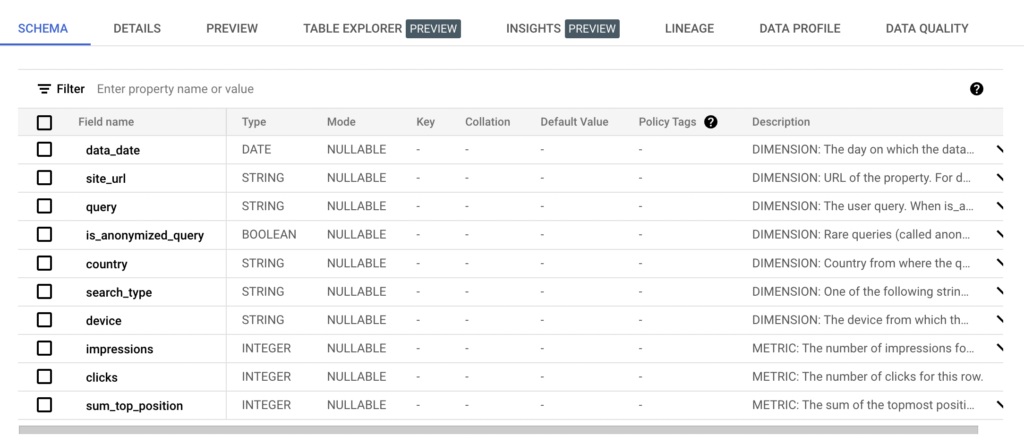
As you begin analyzing your GSC data in BigQuery, you might find yourself asking what some of the columns mean and what their data represents. It's nice to have that information in the BigQuery console, so you don't have to go back and forth between reference documentation and analysis.
Run the two ALTER TABLE commands below to bulk add column descriptions to the searchdata_url_impression and searchdata_site_impression tables. You can see how to run them in the video below, and you can save them by following these instructions.
Edit BigQuery column descriptions with SQL step-by-step
- Use the ALTER TABLE command: The
ALTER TABLEcommand allows you to update column descriptions for BigQuery tables. The syntax is straightforward:ALTER TABLE table_name ALTER COLUMN column_name SET OPTIONS (description = 'your description');Replacetable_namewith your table's name,column_namewith the specific column you want to describe and'your description'with the desired description text. - Run the query: Simply execute this SQL command in your BigQuery console. The query runs quickly, often in just a few seconds.
- Check your changes: After running the command, refresh your table to see the updated descriptions.
- Save the query for reuse: You can save this query for future use. This allows you to easily update descriptions by changing just a few details and running the saved query again whenever necessary.
ALTER TABLE table_name ALTER COLUMN column_name SET OPTIONS (description = 'your description');
This is what the result will look like:
Limitations
- You cannot use a
SELECTstatement or reference other tables to dynamically generate the description. - This method is purely for setting static descriptions.
- This only applies to tables, not views.
Pro tip
To make the process even easier, you can use tools like ChatGPT to automatically generate descriptive text for each column. Then, insert those descriptions into your SQL command, saving time and ensuring consistency.
Here are the complete commands to update the descriptions for the searchdata_site_impression and the searchdata_url_impression tables.
searchdata_site_impression descriptions
ALTER TABLE `mvp-data-321618.searchconsole.searchdata_site_impression`

ALTER COLUMN data_date
SET OPTIONS (description = 'DIMENSION: The day on which the data in this row was generated (Pacific Time).'),

ALTER COLUMN site_url
SET OPTIONS (description = 'DIMENSION: URL of the property. For domain-level properties, this will be sc-domain:property-name. For URL-prefix properties, it will be the full URL of the property definition. Examples: sc-domain:developers.google.com, https://developers.google.com/webmaster-tools/'),

ALTER COLUMN query
SET OPTIONS (description = 'DIMENSION: The user query. When is_anonymized_query is true, this will be a zero-length string.'),

ALTER COLUMN is_anonymized_query
SET OPTIONS (description = 'DIMENSION: Rare queries (called anonymized queries) are marked with this bool. The query field will be null when it''s true to protect the privacy of users making the query.'),

ALTER COLUMN country
SET OPTIONS (description = 'DIMENSION: Country from where the query was made, in ISO-3166-1-Alpha-3 format.'),

ALTER COLUMN search_type
SET OPTIONS (description = 'DIMENSION: One of the following string values: web: The default ("All") tab in Google Search; image: The "Image" tab in Google Search; video: The "Video" tab in Google Search; news: The "News" tab in Google Search; discover: Discover results; googleNews: news.google.com and the Google News app on Android and iOS.'),

ALTER COLUMN device
SET OPTIONS (description = 'DIMENSION: The device from which the query was made.'),

ALTER COLUMN impressions
SET OPTIONS (description = 'METRIC: The number of impressions for this row.'),

ALTER COLUMN clicks
SET OPTIONS (description = 'METRIC: The number of clicks for this row.'),

ALTER COLUMN sum_top_position
SET OPTIONS (description = 'METRIC: The sum of the topmost position of the site in the search results for each impression in that table row, where zero is the top position in the results. To calculate average position (which is 1-based), calculate SUM(sum_top_position)/SUM(impressions) + 1');
searchdata_url_impression descriptions
ALTER TABLE `mvp-data-321618.searchconsole.searchdata_url_impression`
ALTER COLUMN data_date
SET OPTIONS (description = 'DIMENSION: The day on which the data in this row was generated (Pacific Time).'),

ALTER COLUMN site_url
SET OPTIONS (description = 'DIMENSION: URL of the property. For domain-level properties, this will be sc-domain:property-name. For URL-prefix properties, it will be the full URL of the property definition.'),

ALTER COLUMN url
SET OPTIONS (description = 'DIMENSION: The fully-qualified URL where the user eventually lands when they click the search result or Discover story.'),

ALTER COLUMN query
SET OPTIONS (description = 'DIMENSION: The user query. When is_anonymized_query is true, this will be a zero-length string.'),

ALTER COLUMN is_anonymized_query
SET OPTIONS (description = 'DIMENSION: Rare queries (called anonymized queries) are marked with this bool. The query field will be null when it''s true to protect the privacy of users making the query.'),

ALTER COLUMN is_anonymized_discover
SET OPTIONS (description = 'DIMENSION: Whether the data row is under the Discover anonymization threshold. When under the threshold, some other fields (like URL and country) will be missing to protect user privacy.'),

ALTER COLUMN country
SET OPTIONS (description = 'DIMENSION: Country from where the query was made, in ISO-3166-1-Alpha-3 format.'),

ALTER COLUMN search_type
SET OPTIONS (description = 'DIMENSION: One of the following string values web: The default ("All") tab in Google Search; image: The "Image" tab in Google Search; video: The "Video" tab in Google Search; news: The "News" tab in Google Search; discover Discover results; Google news: news.google.com and the Google News app on Android and iOS'),

ALTER COLUMN device
SET OPTIONS (description = 'DIMENSION: The device from which the query was made.'),

ALTER COLUMN is_amp_top_stories
SET OPTIONS (description = 'DIMENSION: Appearance in the Top Stories carousel https://support.google.com/news/publisher-center/answer/9607026?hl=en'),

ALTER COLUMN is_amp_blue_link
SET OPTIONS (description = 'DIMENSION: Appearance as an AMP page listed as a normal blue link.'),

ALTER COLUMN is_job_listing
SET OPTIONS (description = 'DIMENSION: Appearance as a job posting result that shows a summarized view of a job https://developers.google.com/search/docs/appearance/structured-data/job-posting'),

ALTER COLUMN is_job_details
SET OPTIONS (description = 'DIMENSION: Appearance as a detailed view of a job posting.'),

ALTER COLUMN is_tpf_qa
SET OPTIONS (description = 'DIMENSION: Appearance as a Q&A page rich result https://developers.google.com/search/docs/appearance/structured-data/qapage'),

ALTER COLUMN is_tpf_faq
SET OPTIONS (description = 'DIMENSION: Appearance as an FAQ page https://developers.google.com/search/docs/appearance/structured-data/faqpage'),

ALTER COLUMN is_tpf_howto
SET OPTIONS (description = 'DIMENSION: Appearance as a How-to rich result https://developers.google.com/search/docs/appearance/structured-data/how-to'),

ALTER COLUMN is_weblite
SET OPTIONS (description = 'DIMENSION: A deprecated search feature that allowed Google to serve faster, lighter pages to people searching on entry-level devices. https://support.google.com/websearch/answer/9836344'),

ALTER COLUMN is_action
SET OPTIONS (description = 'DIMENSION: Appearance with an action that can be taken on the result https://developers.google.com/assistant/content/overview'),

ALTER COLUMN is_events_listing
SET OPTIONS (description = 'DIMENSION: Appearance as a job posting result listed in a collection of job postings https://developers.google.com/search/docs/appearance/structured-data/job-posting'),

ALTER COLUMN is_events_details
SET OPTIONS (description = 'DIMENSION: Appearance as a detailed description of an event https://developers.google.com/search/docs/appearance/structured-data/event'),

ALTER COLUMN is_search_appearance_android_app
SET OPTIONS (description = 'DIMENSION: Appearance as an event listed among other events https://developers.google.com/search/docs/appearance/structured-data/event'),

ALTER COLUMN is_amp_story
SET OPTIONS (description = 'DIMENSION: Appearance as an article featured in the Top Stories carousel. These used to require AMP but do not any longer. https://developers.google.com/search/docs/appearance/enable-web-stories'),

ALTER COLUMN is_amp_image_result
SET OPTIONS (description = 'DIMENSION: An Image Search result, where the image is hosted in an AMP page https://developers.google.com/search/blog/2019/07/helping-publishers-and-users-get-more'),

ALTER COLUMN is_video
SET OPTIONS (description = 'DIMENSION: Appearance as a video feature that appears in either general search results (type Web) or Discover https://developers.google.com/search/blog/2019/10/search-console-video-results-reports'),

ALTER COLUMN is_organic_shopping
SET OPTIONS (description = 'DIMENSION: Appearance as an organic shopping result https://developers.google.com/search/blog/2022/11/shopping-tab-with-search-console'),

ALTER COLUMN is_review_snippet
SET OPTIONS (description = 'DIMENSION: Appearance with a review snippet rich result https://developers.google.com/search/docs/appearance/structured-data/review-snippet'),

ALTER COLUMN is_special_announcement
SET OPTIONS (description = 'DIMENSION: Appearance with a special announcements structured data element with information. For example, information about COVID-19. https://developers.google.com/search/blog/2020/05/special-announcements-search-console'),

ALTER COLUMN is_recipe_feature
SET OPTIONS (description = 'DIMENSION: Appearances as a recipe listing feature that lists information specific to that recipe. https://developers.google.com/search/docs/appearance/structured-data/recipe'),

ALTER COLUMN is_recipe_rich_snippet
SET OPTIONS (description = 'DIMENSION: A Recipe rich result that appeared outside of the recipe list with more detail https://developers.google.com/search/docs/appearance/structured-data/recipe'),

ALTER COLUMN is_subscribed_content
SET OPTIONS (description = 'DIMENSION: Appearance as a Q&A feature for flashcard pages https://developers.google.com/search/docs/appearance/structured-data/education-qa'),

ALTER COLUMN is_page_experience
SET OPTIONS (description = 'DIMENSION: Appearance while qualified for good page experience https://support.google.com/webmasters/answer/10218333?hl=en'),

ALTER COLUMN is_practice_problems
SET OPTIONS (description = 'DIMENSION: A practice problem search feature https://developers.google.com/search/docs/appearance/structured-data/practice-problems'),

ALTER COLUMN is_math_solvers
SET OPTIONS (description = 'DIMENSION: A math problem search feature https://developers.google.com/search/docs/appearance/structured-data/math-solvers'),

ALTER COLUMN is_translated_result
SET OPTIONS (description = 'DIMENSION: Appearance as a translated result https://developers.google.com/search/docs/appearance/translated-results'),

ALTER COLUMN is_edu_q_and_a
SET OPTIONS (description = 'DIMENSION: Appearance as a Q&A feature for educational content.'),

ALTER COLUMN impressions
SET OPTIONS (description = 'METRIC: The number of impressions for this row.'),

ALTER COLUMN clicks
SET OPTIONS (description = 'METRIC: The number of clicks for this row.'),

ALTER COLUMN sum_position
SET OPTIONS (description = 'METRIC: The sum of the topmost position of the site in the search results for each impression in that table row, where zero is the top position in the results. To calculate the average position (which is 1-based), calculate SUM(sum_position)/SUM(impressions) + 1.'),

ALTER COLUMN is_product_snippets
SET OPTIONS (description = 'DIMENSION: Appearance with product snippets, which provide users with detailed information about a product.'),

ALTER COLUMN is_merchant_listings
SET OPTIONS (description = 'DIMENSION: Appearance in merchant listings, which show a list of merchants offering a product.'),

ALTER COLUMN is_learning_videos
SET OPTIONS (description = 'DIMENSION: Appearance in learning videos, which provide educational video content.');