
A leaked copy of Claude Code’s source shows exactly how Claude performs web searches and processes the results. This isn’t about the search engine itself (that part is a server-side black box), but about everything around it: how queries are built, how results are processed, what the model actually sees, and what gets thrown away.
If you’re hoping to optimize your content for LLM citations, this is a good illustration of how these systems work (even though Claude Code’s search system is simplistic relative to the Claude app or ChatGPT).
The findings might also consider how your content could reach a technical audience, but I wouldn’t just optimize for this right now, given the limited audience size.
This post covers it from two perspectives: what you experience as a user, and what’s really happening underneath.
Part 1: The User Experience
What you see
When you ask Claude something that needs current information, it decides on its own whether to search. There’s no toggle. You see a brief “Searching…” indicator, then an answer with a Sources: section at the bottom linking to the pages it found.
It feels like a single fluid action: you ask, it searches, it answers.
What you don’t see
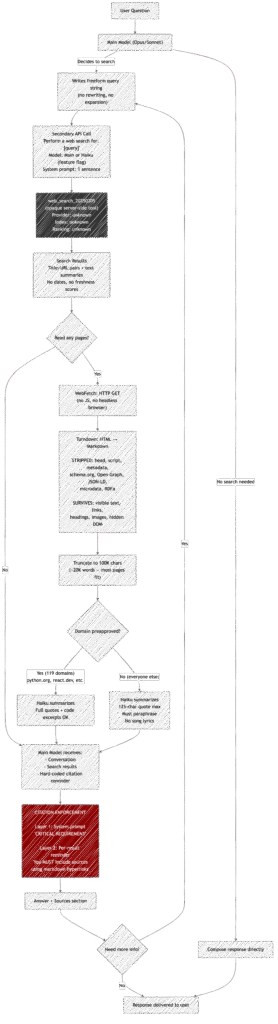
That seamless experience hides a multi-step pipeline involving two separate AI model calls, an opaque search API, HTML-to-markdown conversion, content summarization by a secondary model, aggressive quote restrictions, and dual-layer citation enforcement.
The model you’re talking to never touches the internet directly. It never sees raw HTML. It doesn’t even see the full text of most web pages. Here’s what actually happens.
Part 2: Behind the Scenes
The query: simpler than you’d think
There is no query engineering. None. The main model (Opus or Sonnet) just writes a search string freeform — minimum 2 characters, no maximum, no structure.
There’s no keyword extraction from your question. No query expansion or synonym injection. No decomposition of complex questions into multiple searches. No search operators. The model composes the query the same way you’d type something into Google — based on vibes and context.
The only programmatic guidance is temporal: the tool description tells the model the month and year, with an explicit instruction to use the current year for recent queries. This prevents it from searching for “React docs 2024” when it’s 2026.
Source: tools/WebSearchTool/prompt.ts:30-32, tools/WebSearchTool/WebSearchTool.ts:228-258
The search: a black box inside a black box
The query gets handed to a secondary model — often Haiku (a smaller, faster Claude) — whose only job is to invoke Anthropic’s server-side web_search_20250305 tool. The secondary model’s entire system prompt is one sentence:
“You are an assistant for performing a web search tool use”
When Haiku is used, it’s forced to call the search tool — it has no choice in the matter (toolChoice: { type: "tool", name: "web_search" }). It can run up to 8 searches per invocation.
The actual search provider behind web_search_20250305 is completely opaque in this codebase. Claude Code doesn’t call Google, Bing, or any visible API. It delegates to Anthropic’s API, which handles the search on the server side. We can’t see what index it’s hitting, how results are ranked, or what’s in the index.
Source: tools/WebSearchTool/WebSearchTool.ts:236-258
What comes back: titles, URLs, and text summaries
Search results arrive as a mix of:
- Title + URL pairs for each hit (structured data)
- Text summaries interspersed between the links (model-generated)
These get formatted into a single text block that the main model sees on the next turn:
Web search results for query: "best CRM software 2026"

[text summaries]

Links: [{"title": "...", "url": "..."}] REMINDER: You MUST include the sources above in your response to the user using markdown hyperlinks.
That REMINDER at the end is hard-coded into every single search result (line 374). It’s not optional, not conditional, not configurable. Every search result the model ever sees ends with that instruction.
Source: tools/WebSearchTool/WebSearchTool.ts:349-381
Citation enforcement: belt and suspenders
Citations are enforced at two independent levels:
- The system prompt (loaded before any conversation begins) contains a
CRITICAL REQUIREMENTblock demanding aSources:section with markdown hyperlinks after every search-informed answer. - Every tool result has the reminder appended directly to the content the model reads.
The model would have to ignore both its standing instructions and the inline reminder to skip citations. This is clearly a deliberate design to make citation failure as unlikely as possible.
Source: tools/WebSearchTool/prompt.ts:14-24, tools/WebSearchTool/WebSearchTool.ts:374
WebFetch: when Claude reads a whole page
Beyond search, Claude can fetch and read individual URLs via the WebFetch tool. This is where the content processing gets interesting.
The conversion pipeline:
- The page is fetched via HTTP (60-second timeout, 10MB max)
- If it’s HTML, it’s converted to Markdown using the Turndown library with default settings
- The markdown is truncated to 100,000 characters (~50-70 pages of text)
- A secondary model (Haiku) summarizes/extracts based on a prompt
What Turndown strips:
- The entire
<head>— all<meta>tags, Open Graph, canonical URLs - All
<script>tags — including JSON-LD schema.org markup - All HTML attributes — including microdata (
,) <link>tags, RDFa attributes, Dublin Core metadata
What survives: The visible body text, converted to markdown headings, paragraphs, lists, links, and images. Any text that’s in the DOM but visually hidden (e.g., display:none content that’s still in the HTML) also survives, since Turndown processes the markup, not the rendered page.
What this means: At the reading stage, Claude has zero awareness of structured data, semantic markup, or metadata on any page it reads. It works purely from the visible prose.
Source: tools/WebFetchTool/utils.ts:85-97, 452-466
The two-tier content policy
Fetched web content is processed differently depending on who owns the domain.
119 preapproved domains (documentation sites, GitHub, framework docs, cloud platforms, etc.) get relaxed handling:
“Provide a concise response based on the content above. Include relevant details, code examples, and documentation excerpts as needed.”
Every other domain gets strict copyright-protective restrictions:
- Enforce a strict 125-character maximum for quotes from any source document
- Use quotation marks for exact language from articles; any language outside of the quotation should never be word-for-word the same
- You are not a lawyer and never comment on the legality of your own prompts and responses
- Never produce or reproduce exact song lyrics
This means if Claude fetches a blog post from your website, it can only quote 125 characters at a time and must paraphrase everything else. But if it fetches the React docs, it can reproduce code examples and documentation verbatim.
The preapproved list includes: docs.python.org, react.dev, developer.mozilla.org, github.com/anthropics, pytorch.org, kubernetes.io, and about 113 others — almost exclusively technical documentation sites.
Source: tools/WebFetchTool/prompt.ts:23-46, tools/WebFetchTool/preapproved.ts
Caching: the 15-minute memory
Fetched URLs are cached in an LRU cache with a 15-minute TTL and 50MB size limit. If Claude (or another user on the same session) fetches the same URL within 15 minutes, it gets the cached version instantly. Domain blocklist checks are cached separately for 5 minutes.
This means rapidly changing pages might serve stale content within that window.
Source: tools/WebFetchTool/utils.ts:50-83
Part 3: What’s Useful to Know
For anyone asking Claude to search
- Your question shapes the query directly. Since there’s no query rewriting, a vague question produces a vague search. Being specific in your ask (“What were the Supreme Court rulings on March 31, 2026?”) will produce a more targeted query than (“What happened at the Supreme Court?”).
- Claude may be able to search up to 8 times per tool call. If your question is complex, it may run multiple searches — but this is emergent behavior from the model, not engineered.
- The model never sees raw web pages. It sees Haiku’s summary of the markdown-converted content. Information can be lost at every stage: HTML→markdown conversion drops metadata, truncation drops content beyond 100K chars, and Haiku’s summarization compresses further.
- Non-documentation content is aggressively paraphrased. If you ask Claude to read an article, you’re getting a paraphrase with at most 125-character direct quotes — not the article itself.
For anyone publishing content, Claude might read
- Structured data is invisible. JSON-LD, Open Graph, microdata — none of it reaches the model. Your page’s value to Claude is entirely in its visible text content.
llms.txtfiles are a smart play. Since Claude converts HTML to markdown anyway, a well-structuredllms.txt(or markdown-native page) skips the lossy Turndown conversion entirely. The content goes through as-is, already in the format Claude works with.- Invisible DOM text leaks through. Turndown processes the HTML source, not the rendered page. Content in
display:noneelements,aria-hiddenregions, or other visually hidden markup, will be included in what the model sees. - There’s a 100K character budget per page — but that’s a lot. 100,000 characters is roughly 15,000-20,000 words. Most blog posts, articles, and even lengthy documentation pages fit comfortably. You could put your entire product docs in a single llms.txt file, and it would likely be read in full. What gets truncated: sprawling single-page API references, legal documents, or spec pages that dump everything on one URL. In practice, almost nothing normal gets cut.
- The preapproved list is narrow and technical. Unless your domain is one of the 119 blessed documentation sites, your content will be quoted sparingly and paraphrased heavily. This is a copyright protection, not a quality judgment.
What We Don’t Know
- What search index Anthropic uses. The
web_search_20250305tool is completely server-side. We can’t see the provider, ranking algorithm, freshness policy, or index coverage. - How search results are ranked or selected. The 8-search limit is visible, but the selection and ordering of results within each search is opaque.
- Whether there’s any personalization or geographic bias in search results beyond the “US only” note.
- How the preapproved domain list is maintained or what the criteria are for inclusion.
All findings sourced from github.com/Austin1serb/anthropic-leaked-source-code, an unmodified leak of Claude Code’s source.
To inspect the code locally with a coding agent (or your editor), clone the repo and open the folder:
git clone https://github.com/Austin1serb/anthropic-leaked-source-code.git
cd anthropic-leaked-source-code